
Open SIM Tray Without Tool: Causes and Solutions

Simon Muller
Posted on July 24, 2026

Open SIM Tray Without Tool: Causes and Solutions
You land at a foreign airport. You buy a local physical SIM card to avoid a $15/day roaming fee. You sit at the terminal, ready to swap the cards. You search your bag. The tiny metal ejector tool is missing. You cannot access the foreign phone network. Panic sets in. It is one of several physical SIM card problems, alongside an oxidized SIM card or a chip you need to clean.
You need an immediate internet connection. You cannot leave the airport without ordering a ride or checking your hotel address. A missing piece of metal stands between you and your travel plans. You need a fast, safe way to open that tray without destroying your phone.
Why Does This Problem Occur?
Modern smartphones use a sealed design. Manufacturers eliminated removable back covers years ago to make phones waterproof. The SIM tray now sits flush with the metal frame of your device.
To open it, you must trigger a hidden internal spring. This requires a tool with a very specific diameter. Most people leave this official ejector tool inside the original phone box. You never think about it until you travel.
A connection problem abroad often forces a sudden SIM swap. You face a roaming disabled message. You see a network unavailable error. You need to access a foreign phone service quickly. You look around for anything sharp.
Forcing the wrong object into your phone causes severe damage. You risk breaking the internal spring. You risk puncturing the microphone membrane. If you break the tray mechanism, your phone will not read any network. You then face a much bigger issue. Read about the symptoms of a damaged SIM if you reach this point.
Quick Fix (Solves 80% of Cases)
The standard office paperclip is your best option. It matches the exact diameter of the official extraction tool. It is made of sturdy metal that will not snap under pressure.

Follow these exact steps to open your tray safely:
- Find a standard metal paperclip. Do not use a plastic-coated one.
- Unbend the outer loop to create a single straight wire.
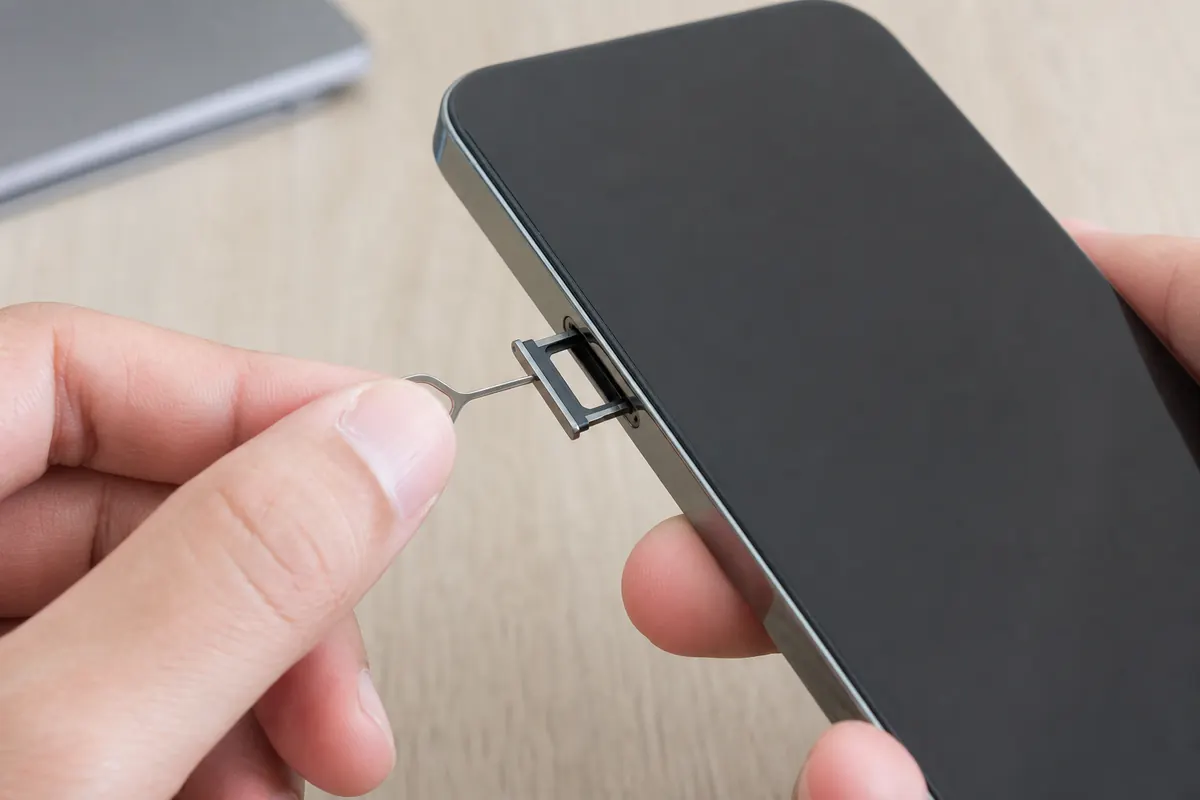
- Locate the SIM tray on your phone. It has an oval outline with a tiny hole inside it.
- Verify the hole. Do not confuse it with the noise-canceling microphone hole at the top or bottom of your phone.
- Insert the straight wire into the SIM tray hole.
- Push straight down with firm, steady pressure.
- The tray pops out with a soft click.
Pull the tray out gently with your fingers. Swap your cards. Push the tray back in until it sits flush with the frame.
Advanced Solutions
You are in a hotel room. You have no paperclips. You still need to fix your roaming problem. You have other options. You must use them with extreme caution.
The Earring Post A standard stud earring works perfectly. Remove the back clasp. Insert the metal post into the SIM hole. Apply steady pressure. The metal is strong enough to trigger the spring without bending.
The Safety Pin A small safety pin fits the hole. Use the sharp point. Push straight in. Do not wiggle the pin. Wiggling widens the hole and damages the tray alignment.
The Sewing Needle Use the blunt end (the eye) if it fits into the hole. If the eye is too thick, you must use the sharp end. Press very slowly. A sharp needle can scratch the internal mechanism if you push too hard.
The Staple A heavy-duty staple can work in an emergency. Bend one leg straight. Staples are thin and can bend easily. Apply pressure slowly to prevent the staple from folding in half.
What You Must Never Use Never use a wooden toothpick. Wood splinters under pressure. The tip will break off inside the hole. The tray will lock permanently. Never use a mechanical pencil tip. The graphite shatters instantly and jams the spring.
If your phone rejects the new physical card after you finally open the tray, you have a software block. Read about the no-SIM message to troubleshoot. Sometimes manual configuration fails entirely. You might need to look up the SM-DP+ activation server to force the network connection.
Prevention
Stop swapping physical SIM cards. Physical cards belong in the past. Every time you open that tray, you risk losing your tiny home SIM card. You risk dust entering your phone.
Keep your physical SIM inside your phone. Keep your home number active for calls and texts. This is exactly how you manage WhatsApp data usage without losing your chat history or contacts.
To prevent this hardware problem for good, a GoMoWorld eSIM solves it upfront. You get a dedicated data plan for your destination.
You install everything via the GoMoWorld app. There is no QR code to scan. There is no physical tool to find. You download the app, choose your destination, and install the eSIM directly on your device.
You control the activation. You tap "Start" in the app when you want your data to begin. The plans never expire until you activate them. Buy your plan weeks before your trip. Activate it while waiting at the baggage claim.
GoMoWorld is data-only. Hotspot is included on all plans. You prepay for your data. You face no overage charges and no surprise bills. If you consume your data quickly, check managing app data abroad to optimize your usage.
AT&T and T-Mobile charge up to $15 per day for international roaming. GoMoWorld offers simple, flat pricing based on duration. The data volume varies by destination, but the prices remain fixed.
| Carrier | Roaming Plan | Estimated Price |
|---|---|---|
| AT&T | International Day Pass | ~$15/day |
| T-Mobile | International Pass | ~$15/day |
| Verizon | TravelPass | ~$10/day |
| GoMoWorld eSIM | 7 days, data tailored | €3.99 |
| GoMoWorld eSIM | 15 days, data tailored | €10.99 |
| GoMoWorld eSIM | 30 days, data tailored | €19.99 |
Leave the physical SIM tray closed. Get your data sorted through the app today. eSIM →
FAQ
How do I open the SIM card compartment without a tool?
Use a standard metal paperclip, an earring post, or a small safety pin. Insert the metal tip into the tiny hole located directly on the SIM tray. Apply firm, steady pressure until the tray pops open.
What is the alternative to the open SIM card extraction tool?
Everyday metal objects with a fine point work best. A paperclip is the safest and most reliable alternative. Avoid fragile wooden objects like toothpicks, as they break easily and jam the mechanism.
How to remove an iPhone SIM card without a tool?
The process is identical for iPhones and Android devices. Find the oval SIM tray on the side frame of your iPhone. Insert a paperclip or earring post into the hole and push straight in to release the spring.


Similar articles

SM-DP+ Address: Complete Troubleshooting Guide

WhatsApp While Traveling: Free or Paid? How to Use It

Data Apps Abroad: Comprehensive Troubleshooting Guide

No SIM Available: Causes and Solutions

Hear from our Happy Travelers
4.7
App Store

4.7
Google Play Store

March 5, 2026
Trustworthy and cheap
A trustworthy and economic way of being in contact with home when travelling


February 27, 2026
Excellent esim
Easy to use. Used in many countries and will continue to use gomoworld


February 26, 2026
Best eSIM prices
Excellent price and good network coverage. Used it for my trips to Turkey and Russia, I faced no issues at all. Recommend!


February 10, 2026
Great eSIM service
I use their esim and I have used them all over India, Colombia, Nicaragua and the US and have not had problems with connection, except high in the mountains where no one has it.

February 7, 2026
Works flawlessly from 1st second
Installing and activating is straightforward, testing the system with a free trial in Switzerland worked fine Connection throughout the Gambia was perfect Renewal after expiration was easy, cheap and quick.


January 25, 2026
Really good data plans withs reasonable prices
GoMoWorld offered the best value out of all the options I considered. The app experience was also superior to other services I’ve tried. There was no ID verification requirement. Payment and setup was super easy. It guides you step by step how to install the eSIM and tells you the recommended settings. I would recommend to anyone looking for lots of data with really competitive prices.

What is an eSIM?
We’ll Explain Everything.
A simple, digital solution for staying connected wherever you Go.

Say Goodbye to Physical SIM Cards
No need to handle a physical SIM card (or risk losing yours)—everything is digital with an eSIM.

Quick and Easy Activation.
Download your GoMoWorld eSIM from our app and get connected in minutes. All our plans start at just €3.99, with no subscriptions or hidden fees.

Perfect for Travelers
Keep your regular SIM active for calls and texts while using GoMoWorld for data. You can have both your primary SIM and eSIM active simultaneously, or two eSIMs.


from
€3.99

Still thinking about it?
Download the app and enjoy a risk-free Trial. Experience GoMoWorld travel eSIM now!
