Help/FAQ
I can’t connect to the Internet (Android)
Follow these steps to ensure your GoMoWorld plan is active and working correctly on your Samsung device:
- Make sure your GoMoWorld eSIM is enabled
- Go to Settings > Connections > SIM card manager
- Verify the eSIM labeled GoMoWorld is enabled
Note: Android devices typically support up to 4 installed eSIMs. If you have more than 4 and experience connectivity issues, try deleting older eSIMs—it often resolves the problem.
- Set GoMoWorld as your mobile data line
- In Settings > Connections > SIM card manager > Preferred SIM cards, set Mobile Data to your GoMoWorld eSIM
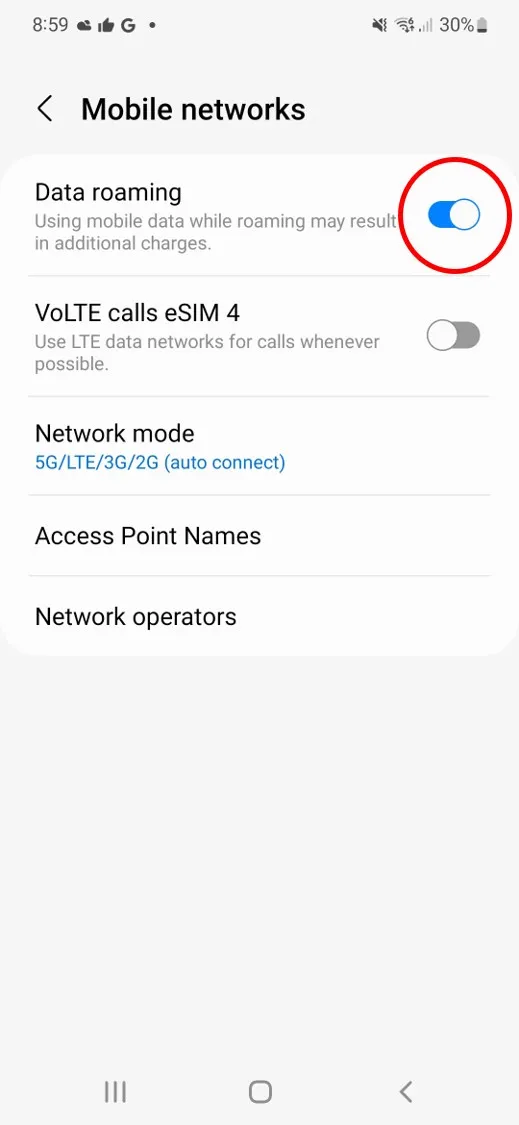
- Enable Data Roaming
- Go to Settings > Connections > Mobile networks (For Samsung and Motorola)
- Go to Settings > Network and Internet > SIMS > GoMoWorld eSIM (for Google Pixel and Oppo)
- Toggle Data roaming ON
→ See: [How do I enable roaming on Android (Google Pixel, Oppo)?]
→ See: [How do I enable roaming on Android (Samsung, Motorola, …)?]
- Check your APN settings
- Go to Settings > Connections > Mobile networks > Access Point Names
- Select your GoMoWorld eSIM profile
- Make sure the APN is set to data.myeirmobile.ie (Eir Data Access Point Name)
→ See: [How do I install a GoMoWorld eSIM on Android (Google Pixel, Oppo)?]
→ See: [How do I install a GoMoWorld eSIM on Android (Samsung, Motorola, …)?]
- Check your mobile network coverage
- Ensure you’re in an area with sufficient signal
- If coverage is weak, try manually selecting a different operator:
Settings > Connections > Mobile networks > Network operators
Note: Network search and selection may take a few minutes, so please be patient
- Verify your active plan
- Open the GoMoWorld app and verify that you have a valid plan for the country or region you’re in and that you started your plan
→ See: [How do I buy and start a plan?]
I can’t connect to the Internet (Android)

I can’t connect to the Internet (iOS)
The eSIM fails to install
I see “eSIM inactive” in the app
My eSIM was installed but it doesn’t work
The eSIM worked before but stopped suddenly
I have installed my eSIM but my device says it is not compatible (Oppo)
My data seems slow or unstable
How do I transfer my eSIM to a new phone?
I can’t connect to the Internet (Android)
Follow these steps to ensure your GoMoWorld plan is active and working correctly on your Samsung device:
- Make sure your GoMoWorld eSIM is enabled
- Go to Settings > Connections > SIM card manager
- Verify the eSIM labeled GoMoWorld is enabled
Note: Android devices typically support up to 4 installed eSIMs. If you have more than 4 and experience connectivity issues, try deleting older eSIMs—it often resolves the problem.
- Set GoMoWorld as your mobile data line
- In Settings > Connections > SIM card manager > Preferred SIM cards, set Mobile Data to your GoMoWorld eSIM
- Enable Data Roaming
- Go to Settings > Connections > Mobile networks (For Samsung and Motorola)
- Go to Settings > Network and Internet > SIMS > GoMoWorld eSIM (for Google Pixel and Oppo)
- Toggle Data roaming ON
→ See: [How do I enable roaming on Android (Google Pixel, Oppo)?]
→ See: [How do I enable roaming on Android (Samsung, Motorola, …)?]
- Check your APN settings
- Go to Settings > Connections > Mobile networks > Access Point Names
- Select your GoMoWorld eSIM profile
- Make sure the APN is set to data.myeirmobile.ie (Eir Data Access Point Name)
→ See: [How do I install a GoMoWorld eSIM on Android (Google Pixel, Oppo)?]
→ See: [How do I install a GoMoWorld eSIM on Android (Samsung, Motorola, …)?]
- Check your mobile network coverage
- Ensure you’re in an area with sufficient signal
- If coverage is weak, try manually selecting a different operator:
Settings > Connections > Mobile networks > Network operators
Note: Network search and selection may take a few minutes, so please be patient
- Verify your active plan
- Open the GoMoWorld app and verify that you have a valid plan for the country or region you’re in and that you started your plan
→ See: [How do I buy and start a plan?]
Need Support?
At GoMoWorld, we're here to help. Chat with our care team and we will be in touch very quickly.
