Help/FAQ
I can’t connect to the Internet (iOS)
If you're having trouble connecting on your iPhone, follow these steps to make sure your GoMoWorld eSIM and data plan are set up correctly:
- Make sure your GoMoWorld eSIM is enabled
- Go to Settings > Mobile Data
- Look for the eSIM label you chose during installation (e.g. “GoMoWorld”). It may appear as “Travel,” “Secondary,” or something similar. You can identify your GoMoWorld eSIM because the number usually begins with several zeros (e.g., 00000…).
- If you have multiple eSIMs, double-check that the correct GoMoWorld eSIM is turned on
→ See: [How do I install an eSIM on iOS?]
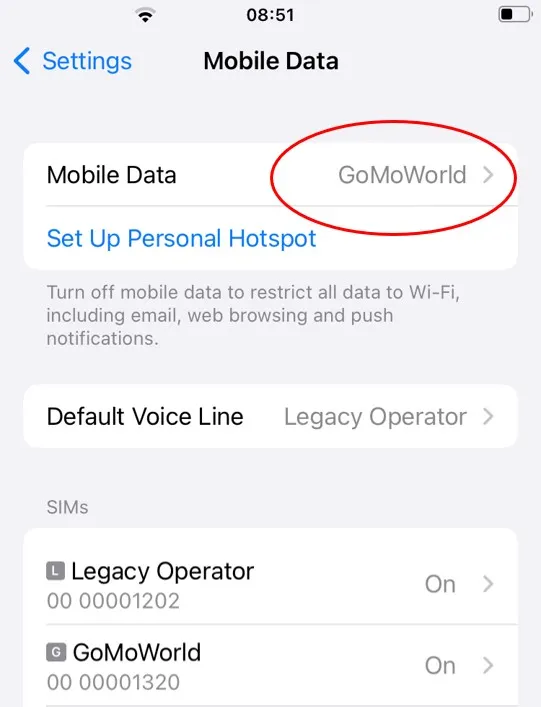
- Set GoMoWorld as your Mobile Data line
- In Settings > Mobile Data, set your GoMoWorld eSIM as the active line for Mobile Data→ This ensures your iPhone uses GoMoWorld for internet access
- Turn on Data Roaming for GoMoWorld
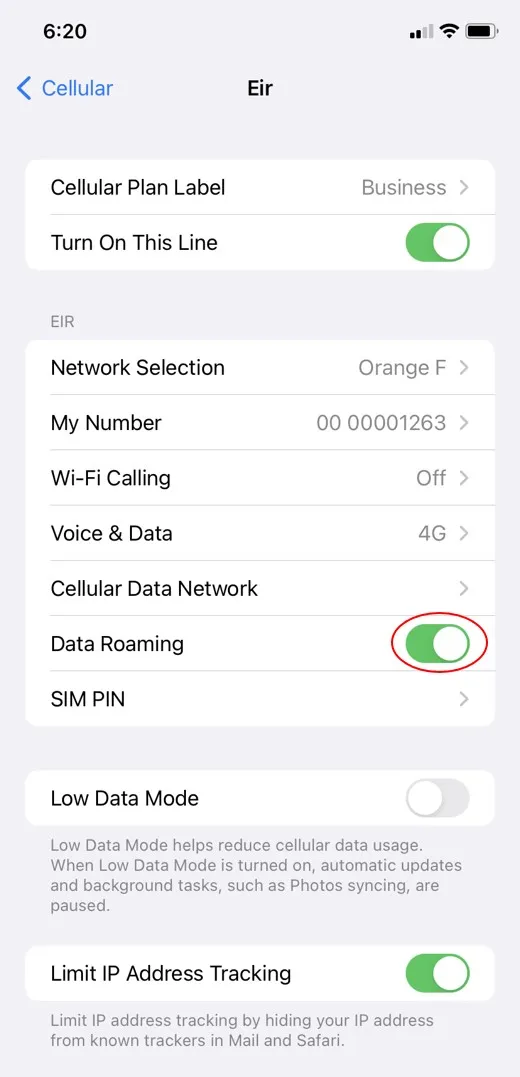
- Go to Settings > Mobile Data > [Your GoMoWorld eSIM]
- Scroll down and toggle on “Data Roaming”
→ See: [How do I activate roaming on iOS?]
- Check your APN settings
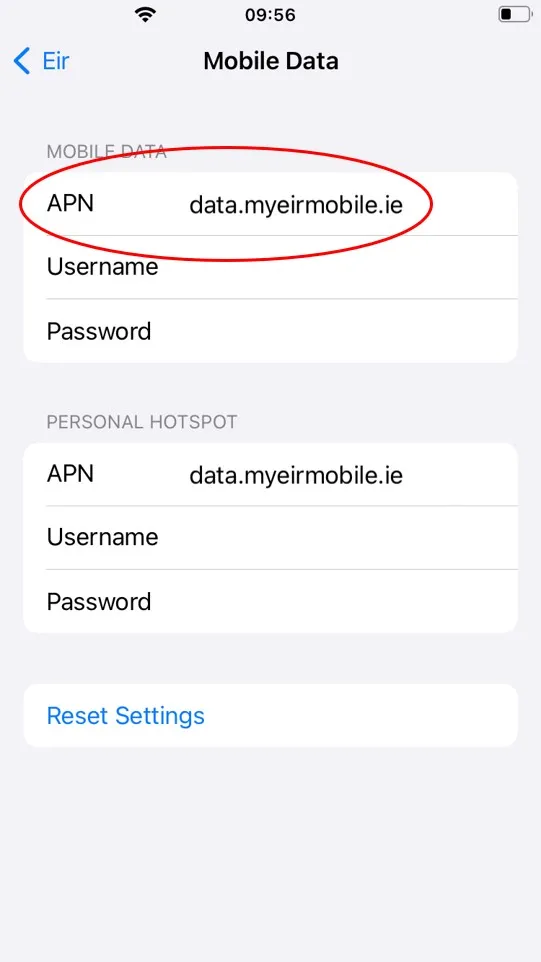
- Go to Settings > Mobile Data > [Your GoMoWorld eSIM] > Mobile Data Network
- Make sure the APN is set to: data.myeirmobile.ie
→ This is required for data to work properly
- Check your mobile network coverage
- If you're in an area with weak signal, GoMoWorld might not connect
- Try manually selecting a different local network in:
Settings > Mobile Data > [Your GoMoWorld eSIM] > Network Selection
⚠️ Note: The network search and selection process can take some time—sometimes up to a few minutes—so please be patient while your device scans for available networks.
- Make sure you have an active plan for your location
Open the GoMoWorld app and verify that you have a valid plan for the country or region you’re in and that you started your plan
→ See: [How do I buy and start a plan?]
✅ If all of the above is configured correctly, your GoMoWorld plan should work instantly on your iPhone.
Need help? Contact support from the app.
I can’t connect to the Internet (Android)

I can’t connect to the Internet (iOS)
The eSIM fails to install
I see “eSIM inactive” in the app
My eSIM was installed but it doesn’t work
The eSIM worked before but stopped suddenly
I have installed my eSIM but my device says it is not compatible (Oppo)
My data seems slow or unstable
How do I transfer my eSIM to a new phone?
I can’t connect to the Internet (iOS)
If you're having trouble connecting on your iPhone, follow these steps to make sure your GoMoWorld eSIM and data plan are set up correctly:
- Make sure your GoMoWorld eSIM is enabled
- Go to Settings > Mobile Data
- Look for the eSIM label you chose during installation (e.g. “GoMoWorld”). It may appear as “Travel,” “Secondary,” or something similar. You can identify your GoMoWorld eSIM because the number usually begins with several zeros (e.g., 00000…).
- If you have multiple eSIMs, double-check that the correct GoMoWorld eSIM is turned on
→ See: [How do I install an eSIM on iOS?]
- Set GoMoWorld as your Mobile Data line
- In Settings > Mobile Data, set your GoMoWorld eSIM as the active line for Mobile Data→ This ensures your iPhone uses GoMoWorld for internet access
- Turn on Data Roaming for GoMoWorld
- Go to Settings > Mobile Data > [Your GoMoWorld eSIM]
- Scroll down and toggle on “Data Roaming”
→ See: [How do I activate roaming on iOS?]
- Check your APN settings
- Go to Settings > Mobile Data > [Your GoMoWorld eSIM] > Mobile Data Network
- Make sure the APN is set to: data.myeirmobile.ie
→ This is required for data to work properly
- Check your mobile network coverage
- If you're in an area with weak signal, GoMoWorld might not connect
- Try manually selecting a different local network in:
Settings > Mobile Data > [Your GoMoWorld eSIM] > Network Selection
⚠️ Note: The network search and selection process can take some time—sometimes up to a few minutes—so please be patient while your device scans for available networks.
- Make sure you have an active plan for your location
Open the GoMoWorld app and verify that you have a valid plan for the country or region you’re in and that you started your plan
→ See: [How do I buy and start a plan?]
✅ If all of the above is configured correctly, your GoMoWorld plan should work instantly on your iPhone.
Need help? Contact support from the app.
Need Support?
At GoMoWorld, we're here to help. Chat with our care team and we will be in touch very quickly.
